
Internal Tools, Operations Dashboards & Automation · Software solution
Turn scattered operational work into one accountable internal workspace
Give operations one controlled workspace for records, queues, approvals, exceptions, and recurring work.
We design and build authenticated internal tools on top of business records and existing systems, with role-based work queues, approvals, notifications, integrations, reporting, audit history, and accountable human exceptions.
Records, roles, and work queues Approvals, integrations, and automation Exceptions, auditability, and ownership
Last reviewed:

Internal dashboards and automation
Internal tools for operational records, work queues, approvals, and controlled automation
We design and build authenticated operational workspaces around the records, roles, decisions, handoffs, and exceptions a team manages every day. The service connects work queues, approvals, notifications, integrations, reporting, permissions, audit history, and human override instead of treating a dashboard as a collection of charts.
What makes an internal dashboard useful in daily operations?
- Map roles, records, sources of truth, decisions, delays, rework, risks, measures, and exception paths before automation
- Build role-based views, queues, assignments, forms, approvals, notifications, imports, exports, APIs, webhooks, and scheduled workflows
- Test permissions, data changes, failures, retries, overrides, reporting, and audit events, then roll out with clear operating and support ownership
A workspace for action
Operational records, role-based work, automation, and traceability
An internal dashboard should help someone see what needs attention, understand the record, take an authorized action, and recover when automation cannot decide safely. We map the existing workflow and systems, then connect views, queues, approvals, notifications, rules, reporting, and audit history around real operational responsibility.
Operational discovery and workflow design
Understand how work currently moves, which records and systems are involved, where decisions happen, and which manual steps are worth changing.
- Role, task, record, system, and handoff mapping
- Volume, delay, rework, risk, and exception review
- Source-of-truth and data-quality assessment
- Priority workflow, measures, constraints, and ownership
Central records, roles, and work queues
Design an authenticated workspace that presents each role with the records, context, status, and actions required to do the job.
- Central records, search, filters, and saved views
- Role-based queues, assignments, statuses, and due work
- Record detail, notes, attachments, and activity context
- Permissions, validation, bulk actions, and recovery states
Approvals, notifications, and workflow automation
Automate repeatable rules and handoffs while preserving human review for ambiguity, policy decisions, and failure conditions.
- Approval, routing, escalation, and notification flows
- API, webhook, import, export, and scheduled integrations
- Rule validation, retries, duplicate handling, and exceptions
- Manual override, owner alerts, and operational visibility
Reporting, auditability, rollout, and ownership
Make work and change traceable, validate the tool with real users, and prepare the team to operate and improve it after rollout.
- Operational reporting and agreed performance measures
- Activity history, audit events, and permission checks
- User acceptance, rollout, training, and support plan
- Documentation, monitoring, known limits, and improvement backlog
Designed forTeams improving an existing operational workflow - not a BI-only reporting project or an undefined request for an entire custom business platform
- Operations teams coordinating work through spreadsheets or disconnected tools
- Managers who need one view of records, queues, and ownership
- SMEs formalizing approvals, exceptions, and recurring processes
- Teams connecting existing systems without replacing every platform
A workflow-first process
From manual work and disconnected records to controlled daily operations
We start with the people doing and supervising the work, not a dashboard template. The records, decisions, permissions, integrations, exceptions, measures, and owners are made explicit before automation grows, then validated with complete operational scenarios.
01
Operations workflowMap, prototype, connect, automate, validate
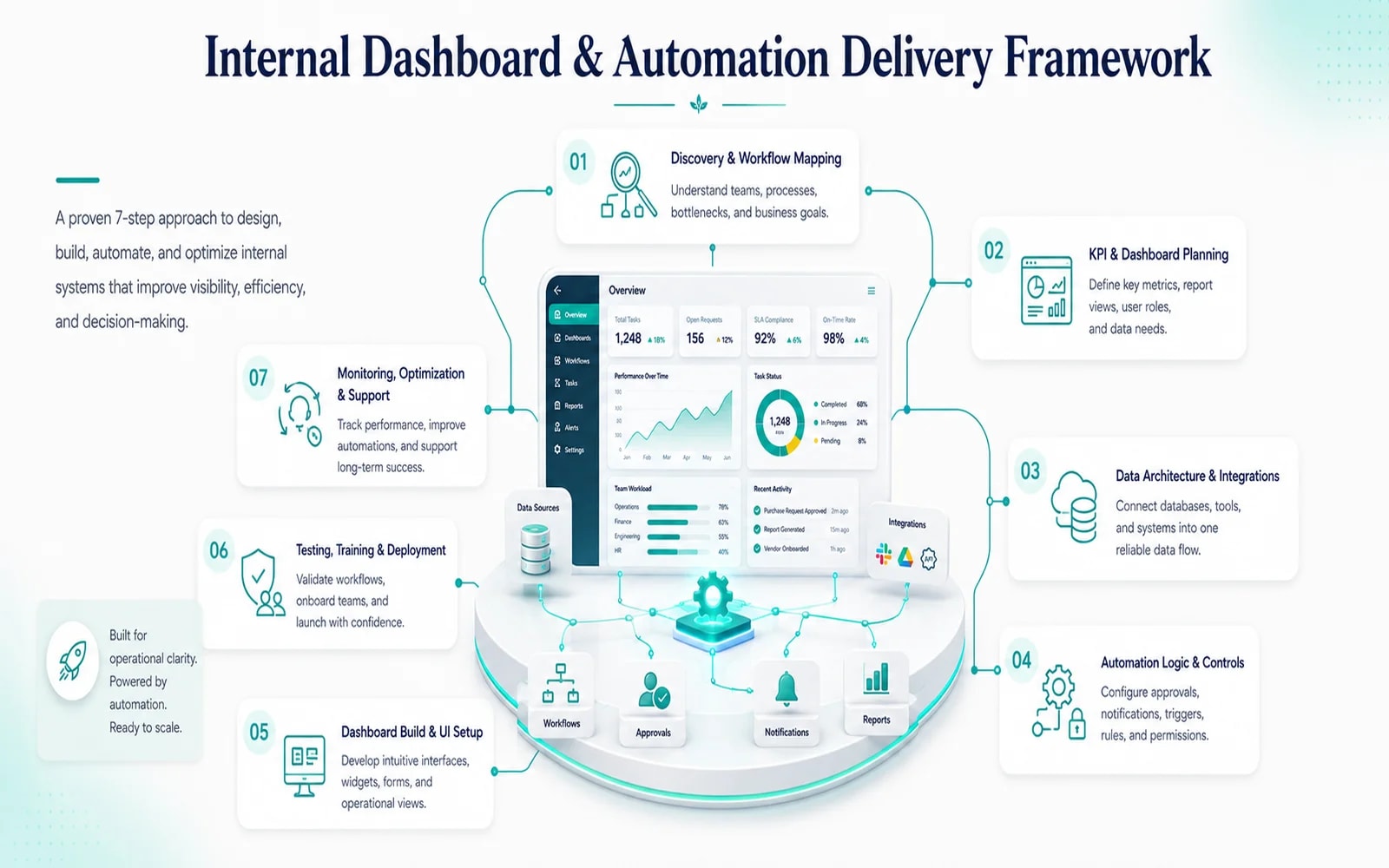
Map roles, records, decisions, and manual work
Observe or reconstruct the current process, roles, records, volumes, sources of truth, repeated actions, decisions, handoffs, delays, risks, reports, and exceptions; then define the workflow worth improving first.
Prototype the workspace, actions, and exception paths
Prototype the workspace, record views, queues, actions, approvals, notifications, rules, reporting, permission boundaries, and exception paths with the people who will use and supervise them.
Build integrations, permissions, and automation
Build the internal interface and data model, connect approved systems, implement controlled automation and alerts, and expose failures, retries, overrides, and audit events to accountable owners.
Validate with users, roll out, and refine
Test representative roles, permissions, records, imports, actions, integrations, failures, reports, and recovery paths; roll out in an agreed sequence, train owners, observe use, and prioritize refinements.
Operations before interface
The dashboard reflects how responsibility, data, and decisions actually move
Internal tools fail when they display information without enabling action, automate an unstable process, or hide exceptions from the people accountable for them. We connect workflow design and software engineering so each view, rule, integration, and report has an operational purpose and owner.
Internal tool capabilities
Next.jsNode.jsSQL databasesRole-based accessAPIs and webhooksApproval workflowsNotificationsAudit history
02
Working principlesAutomate the rule, expose the exception
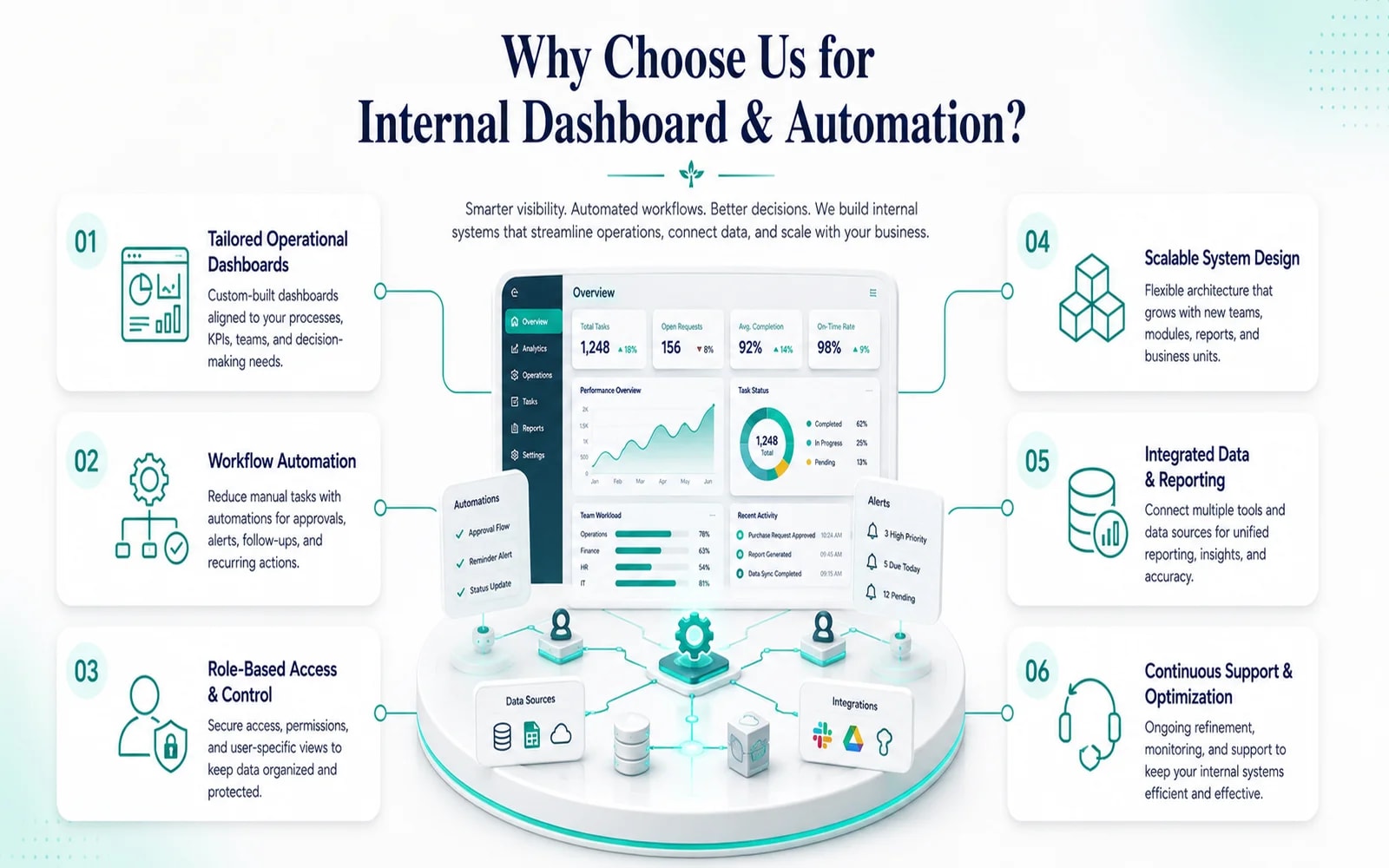
Every view supports a decision
Dashboards, tables, filters, records, and reports are tied to an audience, question, next action, and owner. Decorative metrics do not replace a usable work queue or trustworthy source record.
Human control stays visible
Rules automate stable decisions. Ambiguity, policy exceptions, failures, sensitive actions, and overrides are routed to authorized people with enough context to act safely.
Traceability is designed in
Permissions, status changes, approvals, integration events, retries, edits, and relevant activity history are planned with retention and access needs instead of being reconstructed after an incident.
Questions, answered
Internal Dashboard & Automation FAQ
Direct answers about internal tools, operational dashboards, spreadsheets, integrations, automation, permissions, audit history, rollout, and service boundaries.
Ask about your projectWhat can an Internal Dashboard & Automation engagement include?
The scope can include workflow discovery, role and record mapping, data-source review, an authenticated internal interface, search and filters, role-based queues, assignments, approvals, notifications, forms, imports and exports, APIs and webhooks, scheduled rules, operational reporting, permissions, activity or audit history, exception handling, user testing, rollout, training, documentation, and support ownership. The exact build centers on a specific recurring workflow.
How is this different from Data Analytics & Insights?
Internal Dashboard & Automation is primarily an action system: people review records, own queues, update states, approve decisions, trigger work, and handle exceptions. Data Analytics & Insights is primarily a decision-support service: it defines metrics, prepares and models data, analyzes patterns, and delivers trusted BI or reporting. An internal tool may display operational measures, and a BI product may link to source work, but they have different primary jobs.
How is this different from Custom Software Development?
This service focuses on a bounded internal operational workspace, often layered over existing systems and data: admin views, work queues, approvals, integrations, notifications, and recurring automation. Custom Software Development is broader and better suited when the organization needs a substantial bespoke system with several domains, complex business rules, customer-facing behavior, or a long-term platform roadmap.
Can you replace our spreadsheets?
Potentially, but replacement is not assumed. We first identify what each spreadsheet is doing: source record, calculation, import, report, personal working tool, or exception log. Stable shared records and workflows may move into the internal tool, while flexible analysis or temporary work may remain in a spreadsheet with a clearer exchange process.
Can the dashboard connect to our existing tools?
Yes, where those tools expose suitable APIs, webhooks, database access, imports, or exports and access is authorized. We define sources of truth, data mappings, authentication, timing, rate limits, retries, duplicate handling, monitoring, exceptions, and ownership. Where an integration is brittle or unavailable, we state the limitation and design a controlled alternative.
How do you decide what should be automated?
Good candidates are repeatable, well-understood steps with explicit inputs, rules, outcomes, and owners. We keep human review for ambiguity, judgment, policy exceptions, low-confidence data, sensitive actions, and failures. The scope includes what happens when the automation cannot complete safely, not only the successful path.
How are permissions and audit history handled?
We model roles and actions around least necessary access, define sensitive fields and operations, test representative permission boundaries, and record agreed events such as important views, changes, approvals, overrides, and integration activity. Exact retention, export, review, and compliance needs are requirements to agree; an activity log alone does not establish compliance.
What do we receive at rollout and handover?
Typical outputs include the internal tool, source and deployment guidance, role and permission model, record and workflow definitions, integration and automation notes, exception and monitoring paths, operational reports, acceptance and rollout checks, known limitations, training or user guidance, support ownership, and a prioritized improvement backlog.
Featured Insights
Stories of Digital Transformation Across Services and Industries
From Idea to Impact






Start with the work
Turn one fragmented operational workflow into a clear internal-tool brief.
Tell us which records move between people and systems, where work waits or gets repeated, which decisions need control, and how exceptions are handled today. We will recommend the right dashboard and automation boundary.